

Download YouTube Media with Elegant PyQt6 GUI
TubeReaver efficiently downloads videos, playlists, and audio with comprehensive metadata tagging while providing real-time progress tracking and an intuitive interface for your Ubuntu or Debian-based distribution
Download NowDownload Now
Over 17,200 Linux users worldwide trust TubeReaver
Completely free and open-source
Rated 4.8/5 on GitHub
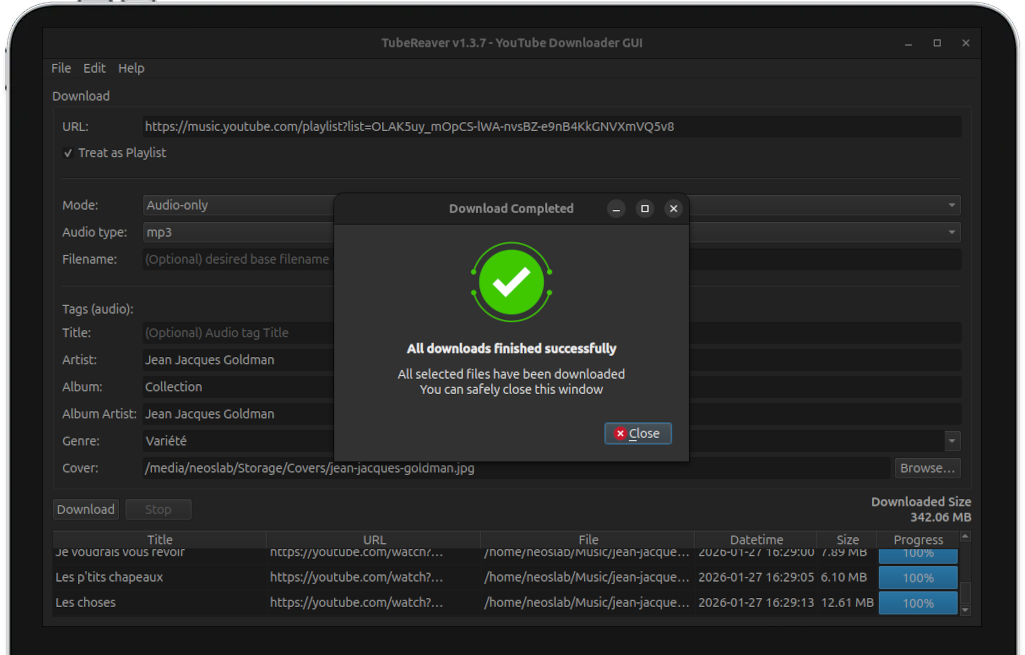


Advanced Downloading with Metadata Preservation
TubeReaver combines intelligent YouTube stream detection with comprehensive tagging capabilities to download content while preserving essential metadata and cover artwork
Real-time progress tracking shows download status, file sizes, and completion percentages with detailed table updates for each download operation
Comprehensive format support includes Highest MP4, Audio-only extraction, manual iTag selection, and playlist downloads with granular control over each download category

Tailored Download Strategies For Your Workflow
Configure TubeReaver precisely to match your specific unique needs with adjustable granular settings for different formats, distinct metadata requirements, and prioritized download preferences
Intelligent algorithms identify available YouTube streams, optimal formats, and metadata while avoiding unsupported or restricted content
Enable or disable specific download categories including video quality, audio formats, metadata embedding, and playlist handling options
68%
Download Success RateSuccessful downloads achieved through reliable pytubefix backend and adaptive stream selection for various YouTube content types
42%
Time SavingsReduction in manual effort through batch playlist downloads, automated metadata tagging, and concurrent download processing
94%
User SatisfactionPositive feedback rating from Linux users appreciating the balance between powerful features and intuitive GUI interface
Comprehensive YouTube Download Solutions
TubeReaver proactively addresses multiple distinct aspects of efficient YouTube content downloading through its specialized format modules and intelligent automated metadata management

Download high-quality MP3/MP4 with automatic resolution detection, format selection, and configurable preferences for optimal viewing experience

Extract audio streams as M4A or MP3 with FFmpeg conversion, configurable bitrate options, and metadata preservation including cover artwork

Download entire YouTube playlists with batch processing, consistent metadata application, and configurable limits for large collections
Advanced Download Optimization Features
Specialized, automated tools for comprehensive YouTube content downloading and integrated metadata management across varied different usage scenarios

Comprehensive ID3 tag embedding with the full title, artist, album, genre, and custom cover artwork support for both popular mp3 and m4a audio file formats

Secure authentication for accessing age-restricted or private YouTube content with encrypted token storage and proper permission handling capabilities

Automated Batch Download Workflows
Configure batch download tasks with specific parameters for different content types, ensuring efficient processing without manual intervention
Advanced automation options include playlist queuing, format consistency across batches, and notification systems for completed download operations

The Complete YouTube Download Platform
TubeReaver consolidates multiple YouTube downloading tasks into a single intuitive interface, replacing fragmented command-line tools with cohesive visual management
From single video downloads to complex playlist processing, TubeReaver provides professional-grade downloading tools suitable for both novice users and experienced content collectors seeking efficient media management solutions
Over 17,200 Linux users worldwide trust TubeReaver
Native Integration With Linux Desktop Environments
Full compatibility with GNOME, KDE Plasma, XFCE, and other popular desktop environments with appropriate theming and notification support
Direct integration with system file managers, media players, and desktop service menus for streamlined user experience across different Linux distributions
Frequently Asked Questions
Find immediate answers to frequently asked questions about TubeReaver's installation process, download features, metadata tagging, and comprehensive system compatibility requirements for different Linux distributions.
View All FAQsView All FAQs- System requirements for TubeReaver
TubeReaver requires Ubuntu 22.04+ or Debian-based systems with Python 3.12+, PyQt6, FFmpeg, and pytubefix. Modern multi-core processor recommended for faster video processing and conversion.
- Supported download formats and features
TubeReaver supports Highest MP4, Audio-only (m4a/mp3), and manual itag selection. Includes metadata tagging, cover image embedding, playlist downloads, and OAuth support for age-restricted content.
- Metadata tagging and organization
Automatic metadata extraction from YouTube with manual override options for title, artist, album, and genre fields
Cover image embedding support with automatic download from YouTube or custom image file selection
- Supported distributions and compatibility
Officially supports Ubuntu 22.04+ and Debian-based systems. Community-tested on Linux Mint, Pop!_OS, and other Debian derivatives with full PyQt6 and FFmpeg functionality.
- Troubleshooting and support resources
Check the GitHub Issues page for known problems and community solutions to common download and metadata challenges
Enable verbose logging in preferences for detailed operation tracking and ensure FFmpeg is properly installed for audio conversion